My journey
I’m on a journey to learn Python and to understand how to work with AI models. While I have a software development background from school, my day-to-day job doesn’t require hands-on coding. To keep my technical skills sharp, and to keep things *spicy* – I’ve decided to dive into Python and AI through practical projects.
Project intro
My original goals:
- Create a chatbot using granite-code to assist with code generation locally.
- Customize it to leverage data from local weather and news APIs.
- Ensure it’s performant, streams chat responses, and is generally awesome.
Simplification:
I used a combination of the free ChatGPT model online and ran granite-code locally to assist with code generation. Without a dedicated GPU, I opted for ChatGPT for its speed. Using Ollama, I managed to work with the reasonably-sized granite-code:3b locally.
I saved the API integration for a subsequent iteration. I initially scripted a call to a weather API, successfully pulling data, but parsing JSON and handling text inputs introduced complexity. I decided to focus on basic functionality first and tackle more advanced features later.
Prerequisites
1. Download Ollama and pull the model
ollama pull phi32. Create a python virtual environment
python -m venv chatvenv3. Activate the virtual environment and install dependencies
source chatvenv/bin/activate
pip install langchain langchain_community
Using a virtual environment ensures that packages are installed only for this project, avoiding conflicts with other applications or issues with packages in various locations. I learned this through trial and error.
Chat Application Code
This project required multiple iterations with granite-code and ChatGPT to refine my approach. Here’s the final streamlined version:
from langchain_community.llms import Ollama
from langchain_community.chat_models.ollama import ChatOllama
from langchain.chains import ConversationChain
from langchain.memory import ConversationBufferMemory

llm = ChatOllama(temperature=0.0, model="phi3")
memory = ConversationBufferMemory()
chain = ConversationChain(llm=llm, memory=memory)

def chatbot_response(input_message):
    # Invoke conversation chain
    response = chain.invoke({"input": input_message})

    # Extract relevant information from response
    chatbot_response = response["response"]

    return chatbot_response

# Main function for interactive session
def main():
    print("Hello! How can I help you today, Taylor?")
    while True:
        input_message = input("> ")
        if input_message.lower() in ['exit', 'quit', 'bye']:
            print("Bye! See you later.")
            break
        response = chatbot_response(input_message)
        print(response)

if __name__ == "__main__":
    main()
How It Looks in Action
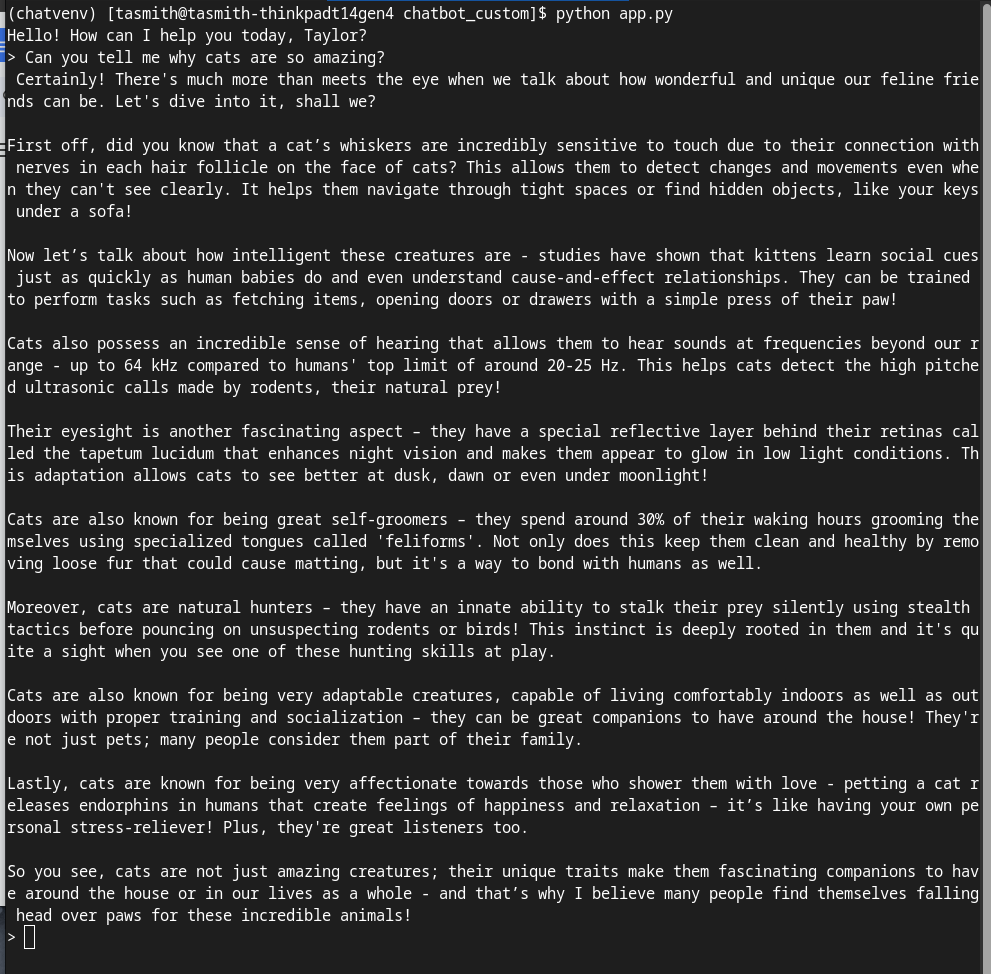
Great, thank you phi3 and my chatbot application!
Key Takeaways
**Start Simple** When learning new things, start simple and build up. Initially, I wanted a custom, performant chatbot. I realized I needed to build my skills from the basics, and that’s okay.
**GPU Importance** When people talk about needing GPUs, they aren’t kidding. Running models on a CPU limits you to smaller models locally. While this made things slightly less fun, Ollama offers several small models that worked well. In the future, I’ll explore cloud deployment for more flexibility.
**AI for Code Generation** AI makes learning a new language less painful. When I learned Java a few years ago in school, I spent a lot of time googling and scouring Stack Overflow. It took forever. AI helps you get started and debug faster. However, it’s crucial to think critically about the code generated by AI. It could be blatantly wrong, but it might also just not be good.
**Ask AI for Explanations** When learning, ask AI to explain the code to you. Understanding each line’s purpose enhances your learning experience.
**Coding with AI Models** Working with AI models is interesting and challenging. There are many things you could do and try, and many ways to create and implement. It’s fun!
By sharing my journey, I hope to inspire others to dive into AI and coding. Happy learning!
 Taylor's Tech Tales
Leave a comment